 Watchfox
Detect public website failures
Monitor the homepage, shop, checkout, campaign page, or another public URL that represents a real customer-facing outcome.
Check public availability, stable content, certificate and domain risks, scheduled jobs, and sitemap health—then turn the verified evidence into alerts, status communication, and client reports.
Watch a real Watchfox workflow covering Uptime versus Keyword checks, successful content matching, mismatch diagnostics, cache evidence, and the large-response inspection limit.
Watch the WordPress monitoring tutorial on YouTube →Use the Website Maintenance Monitoring Checklist for Agencies to agree checks, owners, alert tests and client evidence before taking on a maintenance website.
A website can return HTTP 200 while showing stale content, a scheduled backup can stop while the homepage still loads, and certificate or domain renewal risks can remain invisible until they become urgent.
Monitor the homepage, shop, checkout, campaign page, or another public URL that represents a real customer-facing outcome.
Use a stable server-rendered phrase when a successful HTTP response alone does not prove that the expected WordPress content is present.
Use Heartbeat for backups, imports, feeds, synchronizations, or scheduled tasks that can fail without making the public website unavailable.
Start with the smallest set that represents the service you actually provide. Add another check only when it answers a different operational question.
| Monitor | WordPress or WooCommerce use | Important boundary |
|---|---|---|
| Uptime | Confirm a public page or endpoint responds with the expected HTTP status. | It verifies availability, not whether all visible content or JavaScript behavior is correct. |
| Keyword | Confirm a stable server-rendered heading, product state, or maintenance message is present or absent. | It is not a browser, login flow, or JavaScript transaction test. |
| TLS | Track certificate validity and expiry awareness for the intended HTTPS hostname. | Unknown or source-limited evidence is not the same as a confirmed outage. |
| Domain | Surface registration-expiry risk when registry or RDAP data is available. | Coverage varies; the registrar remains the authoritative renewal source. |
| Heartbeat | Detect a missing ping from a backup, import, feed, synchronization, or scheduled task. | The monitored job must call the private Watchfox heartbeat URL. |
| Sitemap | Validate the sitemap and representative listed-URL findings within the supported scope. | It is bounded sitemap monitoring, not a complete deep crawler. |
A browser and Watchfox may receive different HTML because of page cache, CDN cache, cookies, language, user agent, location, authentication, or client-side rendering.
Review the final URL, response age, body size, ETag, Last-Modified, and cache-related headers where available. A stale response can be a real CDN or WordPress cache issue rather than a scheduler problem.
too_large as unknown content stateThe current Keyword inspection limit is 256 KiB. When the response exceeds it, Watchfox does not claim that the keyword is missing; the content rule was not evaluated safely.
Keep the setup customer-specific so alerts, status communication, exports, and reports all represent the same maintenance boundary.
Use one project for the website, customer, or reporting boundary.
Start with Uptime, then add Keyword only for a separate content outcome.
Add TLS, Domain, Heartbeat, or Sitemap when they are part of the service.
Configure the people or channels that can act and send a safe test.
Use a status page or client report only after the underlying checks are verified.
Open monitor detail, confirm that a genuine check completed, verify the expected status or content rule, and make sure the monitor belongs to the intended client project.
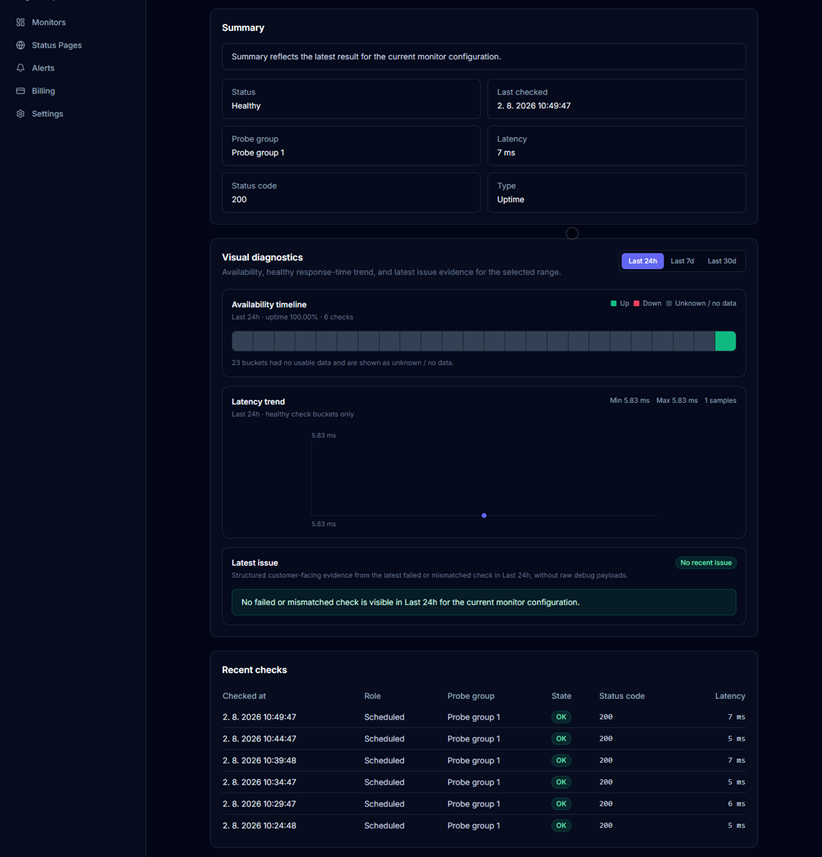
A real completed check is the starting point for reliable alerts, incident history, status communication, and client reporting.
The monitor set should map directly to the care-plan outcomes the agency can describe and support.
Alerts help the agency act. Status pages and reports help the client understand what happened without exposing raw provider errors, internal IDs, tokens, or implementation details.
Create public or private status pages with customer-readable components, maintenance context, and incident updates when the client needs ongoing communication.
Use monthly or custom PDF reports to summarize web uptime, incidents, availability history, and separate operational context for the selected client project.
Watchfox is designed to complement a maintenance stack, not to replace every WordPress operations, security, testing, or hosting tool.
Normal Uptime and Keyword monitoring uses one primary scheduled probe group. Eligible failures may use additional smart outage verification coverage. Internal worker labels are not marketed as guaranteed geographic origins.
No. Watchfox monitors website and scheduled-job outcomes from outside WordPress. Heartbeat monitoring requires the selected backup, import, feed, or scheduled task to call its Watchfox heartbeat URL.
Use Uptime when availability and HTTP status are the requirement. Add Keyword only when a stable server-rendered phrase must be present or absent and that content check answers a separate customer outcome.
Keyword monitor detail can expose cache-related headers, response age, body size, ETag, Last-Modified, and final URL evidence where available. This helps explain why Watchfox and a browser may receive different content, but Watchfox does not manage or purge the cache for you.
It means the response exceeded the current 256 KiB keyword-inspection limit, so the rule was not evaluated safely. Use a smaller endpoint, reduce the response, or use Uptime when body inspection is not required.
No. Watchfox does not replace malware scanning, plugin or theme vulnerability management, visual regression testing, browser transactions, or WordPress update management. It focuses on website, content, certificate, domain, scheduled-job, and sitemap outcomes.
Product behavior and limits verified on August 6, 2026.
Create the client project, add one Uptime monitor, verify the first real check, test an alert destination, and expand only when each additional monitor represents a distinct maintenance outcome.