 Watchfox
Summarize the reporting period
Show the selected month or range, data timestamp, average web uptime, incidents, downtime, longest incident, MTTR, and included monitor count.
Create a clear monthly or custom PDF with uptime, incidents, availability history, operational context, agency branding, and controlled delivery from the same client project.
Watch the Watchfox reporting workflow from monitored client data through a branded monthly PDF, CSV exports, report branding, and scheduled client delivery.
Watch the reporting tutorial on YouTube →A useful client report should explain what was monitored, what happened, and how to interpret the numbers. It should not be a raw event dump or an unsupported promise of perfect availability.
Show the selected month or range, data timestamp, average web uptime, incidents, downtime, longest incident, MTTR, and included monitor count.
Separate website availability from TLS, Domain, Heartbeat, and Sitemap signals so different operational questions are not mixed into one percentage.
Use one project per client, review the same summary each month, apply consistent branding, and schedule delivery only after the report is verified.
The current Watchfox PDF is intentionally concise. It gives a client-readable overview while keeping detailed authenticated exports available separately.
| Report section | What it answers | Important interpretation |
|---|---|---|
| Executive summary | How the included web monitors performed during the selected period. | Avg uptime is calculated from enabled Uptime and Keyword monitors with report-window data. |
| Reporting target | Whether actual uptime met the optional project target. | The target is informational and is not an automatic SLA guarantee. |
| Month-over-month trends | How a monthly report compares with the previous calendar month. | Shown only when comparable previous-month data is available. |
| Daily availability | Where included web monitors were up, down, mixed, or without data. | Availability history follows the retention-aware report sources. |
| Incident timeline | Which incidents overlapped the report period and how long they lasted inside it. | Ongoing incidents are bounded by the report's Data as of timestamp. |
| Other monitor types | Current TLS, Domain, Heartbeat, and Sitemap context. | These summaries remain separate from Avg uptime. |
| Detailed data links | Where an authorized user can obtain summary, incident, and recent raw-check CSV data. | Raw monitor checks are retention-limited and may not cover older periods. |
Reporting quality starts before the PDF is generated. The project, monitors, naming, and incident history must already represent the intended customer boundary.
Use one project for the client, product, or reporting boundary.
Add Uptime and Keyword monitors only for distinct website outcomes.
Check the period, included monitor set, incidents, and Data as of timestamp.
Use customer-safe brand, logo, footer, and report-target settings.
Review the PDF first, then configure project recipients and test delivery.
A polished report cannot compensate for a monitor that never completed a real check, uses the wrong client project, or measures the wrong outcome.
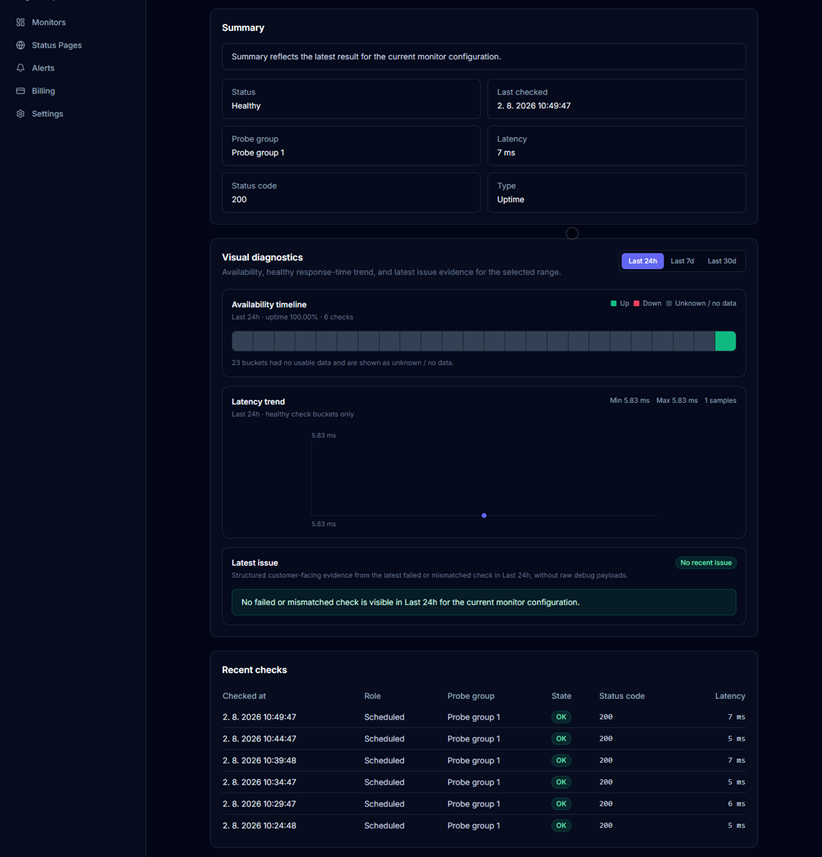
Verify a genuine check completed and the monitor label and project context are suitable for a future client report.
Executive summary, reporting target, trends, availability history, incident timeline, current health, and detailed-data links.
The public sample uses demonstration data and shows the current report structure without exposing a customer project.
These distinctions prevent a client-facing report from making broader claims than the underlying monitoring evidence supports.
It is the average uptime percentage across included enabled Uptime and Keyword monitors that have data in the report window. It is not a universal score for every system the client operates.
Downtime is summed across included monitors. Parallel incidents on different monitors can overlap, so this figure is not the same as total project-wide outage time.
A source-limited or unclear result remains unknown unless Watchfox has enough evidence to classify the monitored outcome as failed.
Recent troubleshooting uses raw checks; older report periods use rollups, daily summaries, and incidents according to the current retention model.
Watchfox provides monitoring evidence and an optional reporting target. Contractual availability definitions, exclusions, maintenance treatment, and remedies still belong in the agreement between the agency and its client.
Branding is workspace-scoped. Scheduled recipients are project-scoped. Keep those boundaries clear so the right presentation reaches the right client.
Eligible plans can set the brand name, supported logo URL, footer note, and white-label behavior used by PDF reports.
Agency and Pro can enable month-end delivery separately for each active project, configure recipients, send a test report, and review delivery audit state.
€490 / $490 yearly. Prices exclude applicable taxes; Paddle handles the final checkout.
Pro extends the same reporting workflow to higher monitor and recipient limits and adds Public API access. Free and Starter remain useful for evaluation or smaller monitoring use, but PDF reporting and scheduled delivery require Agency or Pro.
Use Watchfox reports for monitored website outcomes and operational context. Do not silently extend them to systems, regions, or contractual promises that are not represented by the configured checks.
Report uptime metrics include enabled Uptime and Keyword monitors in the selected project and period. Monitors without report-window data do not contribute a fabricated uptime value.
Yes. They are summarized separately as operational context, but they do not change Avg uptime because certificate, domain, scheduled-job, and sitemap states are different measurements from website availability.
Agency and Pro plans can configure workspace-level report branding, including a brand name, supported logo URL, footer note, and Watchfox white-label behavior within the current plan rules.
Agency and Pro can configure project-scoped monthly delivery. Agency supports up to five recipients per project and Pro up to ten, subject to the shared monthly automation-email budget and normal delivery safeguards.
No. The project reporting target is informational monitoring context. It does not automatically create a contractual or legal service-level guarantee.
Product and plan details verified on August 6, 2026.
Create the client project, verify the monitor evidence, review the report semantics, download the PDF, and only then enable scheduled delivery.