 Watchfox
Separate every client clearly
Use one project per client or reporting boundary so monitors, incidents, status communication, and exports stay understandable.
Organize client sites into clear projects, catch practical website and scheduled-job failures, communicate incidents, and create professional reports from one agency-friendly workflow.
Watch how an agency can separate client projects, use different monitor mixes, publish a client-facing status page, and monitor a scheduled job with Heartbeat.
Watch the tutorial on YouTube →Use the Website Maintenance Monitoring Checklist for Agencies to agree checks, owners, alert tests and client evidence before taking on a maintenance website.
Watchfox is designed for small web, WordPress, e-commerce, and maintenance teams that manage multiple customer sites but do not need a full observability platform.
Use one project per client or reporting boundary so monitors, incidents, status communication, and exports stay understandable.
Configure email, Slack, webhook, Teams, Discord, or Google Chat channels and test each changed destination before relying on it.
Turn web uptime, incidents, and monitor history into reports and status communication that are easier to discuss with a client.
The structure is intentionally simple. Each level has a clear operational and customer-facing role.
Your agency, freelance business, or operating team.
One client, product, website group, or reporting boundary.
Specific questions about availability, content, expiry, jobs, or sitemaps.
Operational alerts plus public or private status information.
Project health, incidents, and maintenance evidence for the selected period.
Start small. Add a monitor only when it answers a separate operational question that matters to the client or maintenance team.
| Monitor | Agency use | Use it when |
|---|---|---|
| Uptime | Confirm a public page or important endpoint responds with the expected status. | Almost every maintained production website. |
| Keyword | Verify a specific server-rendered phrase is present or absent. | A successful HTTP response is not enough to prove useful content. |
| TLS | Track certificate validity and expiry awareness. | The agency is responsible for certificate continuity. |
| Domain | Surface domain-expiry information when registry data is available. | Domain renewal is part of the care or hosting service. |
| Heartbeat | Detect missing pings from backups, imports, feeds, billing jobs, or scheduled tasks. | A background job can fail while the public website still loads. |
| Sitemap | Validate the sitemap and listed URLs within the supported sitemap scope. | Sitemap health and listed pages are part of the maintenance promise. |
More monitors are useful only when they represent separate customer outcomes. Duplicating the same check does not create better evidence and consumes workspace limits.
These production-safe QA screenshots show the current Watchfox interface used in the onboarding guide.
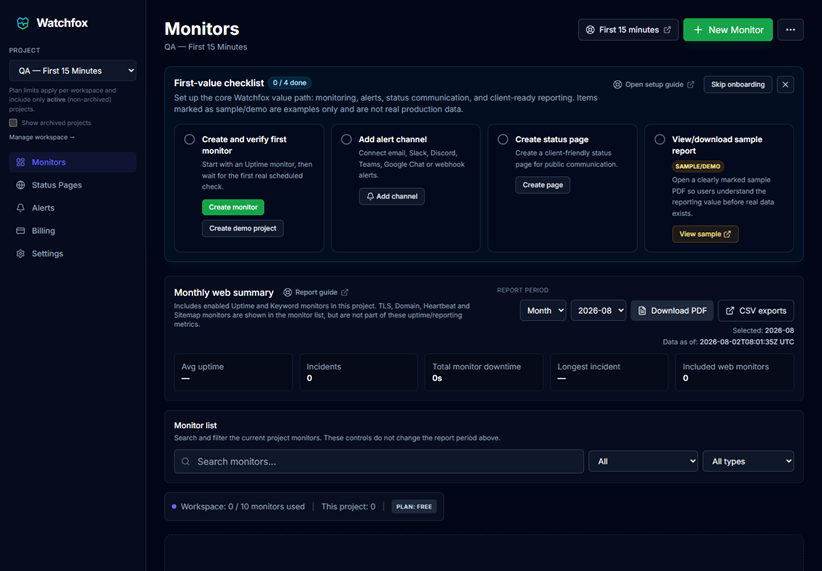
Project selection keeps monitors and future reports inside the correct customer boundary.
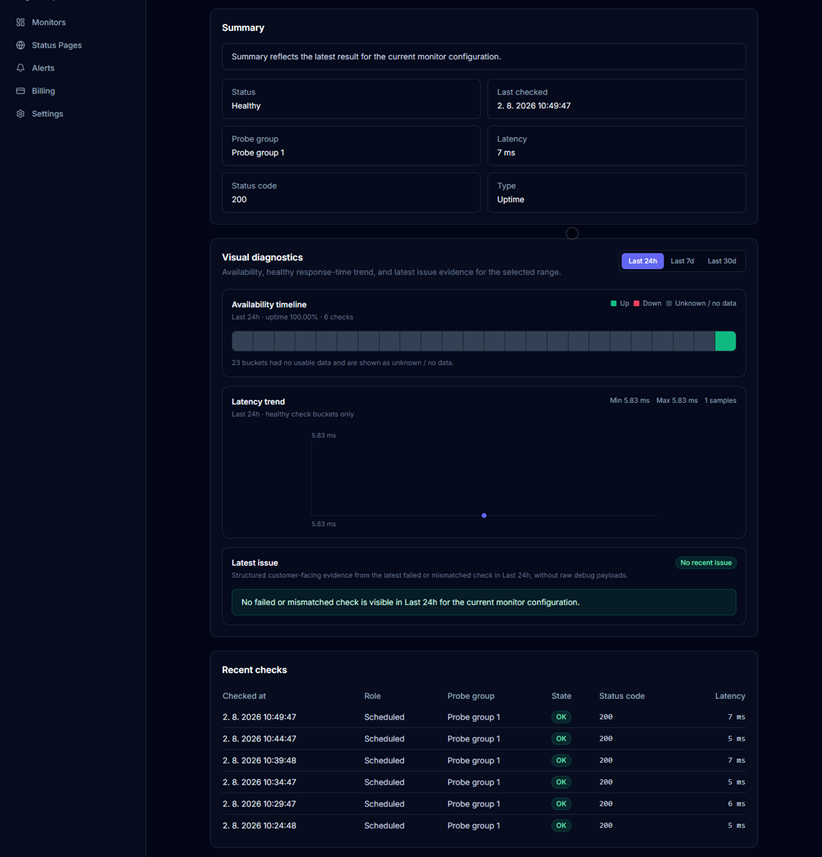
Confirm that a genuine check completed and that monitor detail agrees with the dashboard before onboarding the client.
Watchfox separates internal response from customer-safe communication so raw implementation details do not have to become the client experience.
Use customer-readable components, maintenance context, and incident updates without exposing internal IDs, tokens, private URLs, raw provider errors, or quota details.
Web report summaries use enabled Uptime and Keyword monitors for the selected project and period. Other monitor types remain visible operationally but are not folded into web uptime percentages.
€490 / $490 yearly. Prices exclude applicable taxes; Paddle handles the final checkout.
The Free and Starter plans are useful for evaluation or smaller production use. Agency is the intended fit when client reporting, branding, status communication, and a broader portfolio become part of the service.
Watchfox is easier to operate because it does not try to become a general infrastructure or full-observability platform.
Normal Uptime and Keyword monitoring uses one primary scheduled probe group. Eligible failures may use additional smart outage verification coverage. Internal worker labels are not marketed as guaranteed geographic origins.
Use one workspace for the agency or operating team and one project for each client, product, or clear reporting boundary. Add monitors, alerts, status pages, and reports inside the intended project.
Start with Uptime for availability, TLS and Domain for expiry awareness, and Heartbeat for scheduled jobs. Add Keyword or Sitemap monitoring only when they answer a specific customer outcome.
Yes. Eligible plans can generate monthly and custom PDF reports. Agency and Pro workflows can also use report branding and scheduled delivery within current plan limits.
No. Watchfox intentionally focuses on website checks, alerts, status communication, reports, and clean workspace management rather than APM, log ingestion, distributed tracing, or server agents.
Product and plan details verified on August 5, 2026.
Add a real website, verify the first check, test an alert channel, and expand only when each monitor answers a useful operational question.